Pandas (ODK)
It is a implementation of an ETL in Pandas (Python enviroment). Currently, it is just working to process files from ODK in Excel format. It has a set of scripts which are available at: https://github.com/CIAT-DAPA/aeps_platform_etl/tree/dev/src/python
Tip
In the followings diagrams you will see some box in red and others in green color. The boxes with green color have some considerations that you should check into of source code.
conf.py
This script has a set of global parameters which you should pay attention. Let’s to see some important variables which you should set before to execute the process:
Var |
Description |
|---|---|
env |
It sets which is the enviroment in which all process will be executed. Depending of this value it will search the files configuration.xlsx and form.xlsx e.g.: if you set the parameter empty, it will search the files configuration.xlsx and form.xlsx, however if you set .dev, it will search the files configuration.dev.xlsx and form.dev.xlsx |
path_root |
It sets which is root folder for the ETL |
tables_master |
It sets a list of tables which are parted of the form. Remember the difference between form and survey: Form: refers to the overview. The questions about farmers, technical assistants and farms are in the head of the form, while the Survey: refers to the questions that are related with the production events. Also you will see by default that tables like con_countries, con_states, con_municipalities and soc_people have a _1 or _2, it is just to discriminate information about farmers and technical assistants, so _1 is to process data about technical assistans and _2 is to process data about farmers. |
Translation
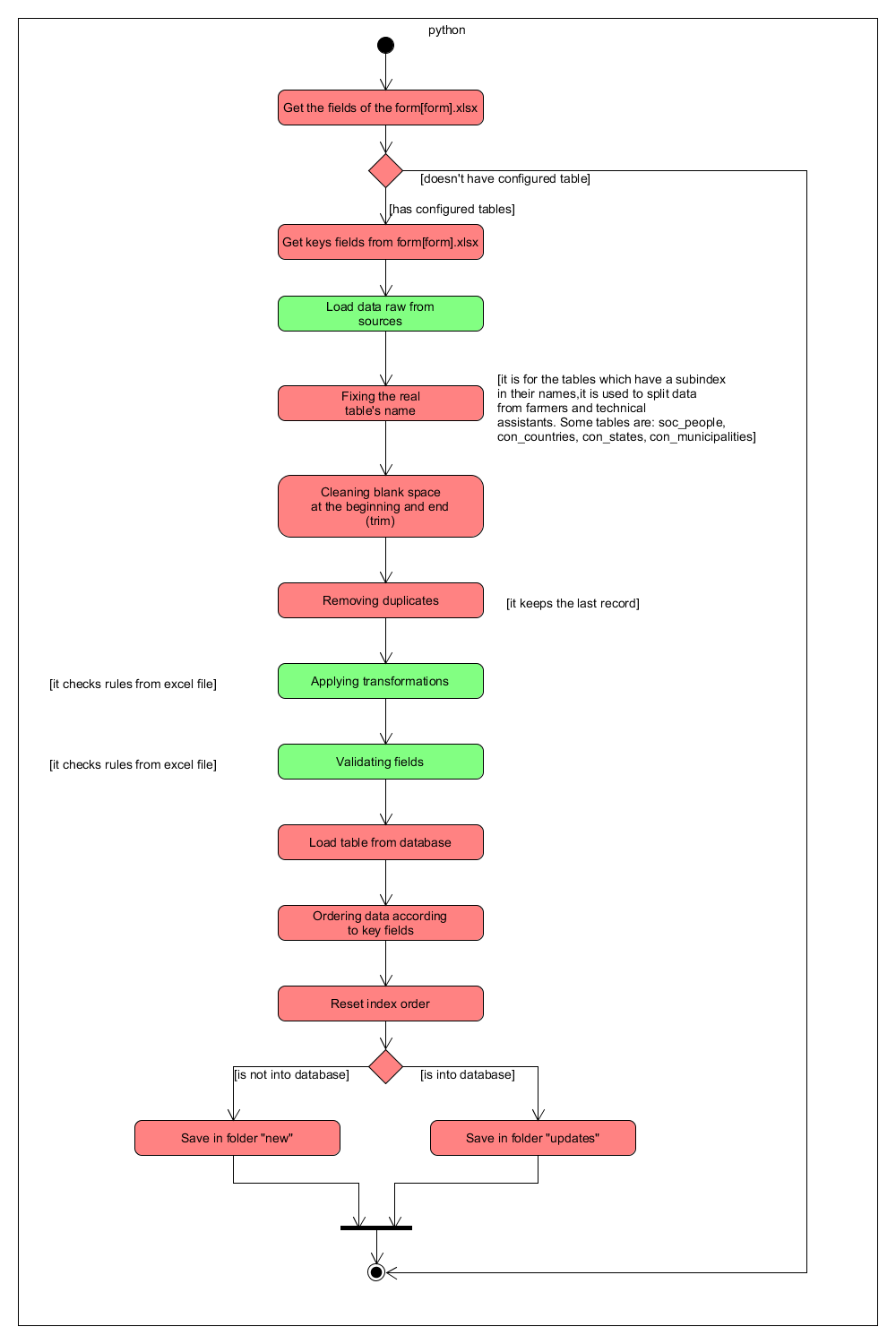
It is the process which takes the raw data and transforms them in files in the database structure. Overall, it loads the parameters, then get raw data and set the configurations values, then it stablishes connection with the database. Once it is ready, it starts to process the form (you can see more information forward), in order to do that, it checks the tables related about the general information, once it has processed the form, starts to process the survey. Those steps are repeated for all datasources. The following picture show the general process followed by this ETL:

Processing form: This process will take the information from the raw data, it will takes data about countries, states, municipalities, people, technical assistants, farms, plots and production events. Then that it transforms and validates data, it will create the files for each table of the database (con_countries, con_states, con_municipalities, soc_associations, soc_people, soc_technical_assistants, far_farms, far_plots, far_production_events). If you want to change the tables which will be processed you should change the variable tables_master of conf.py).
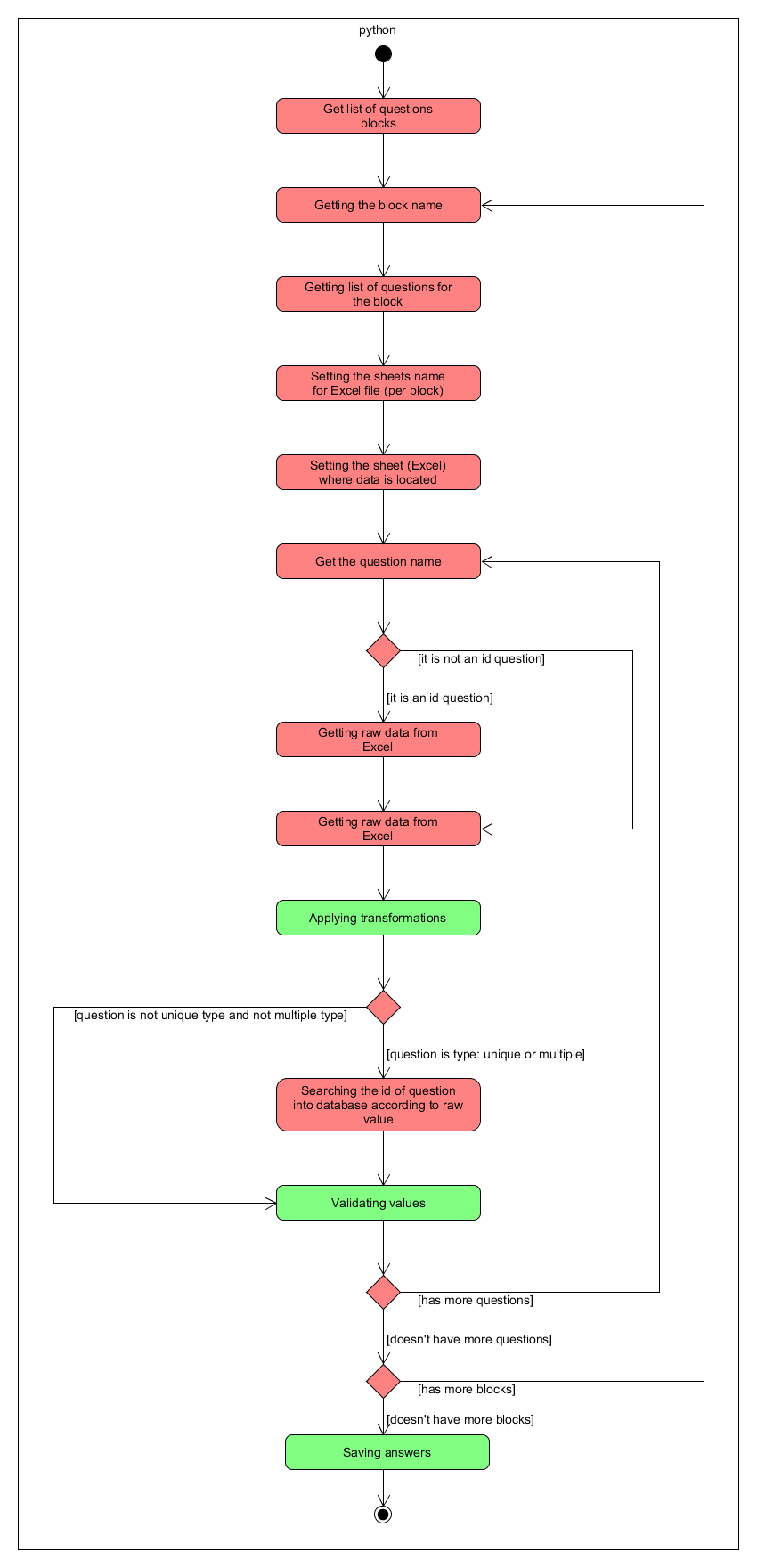
Processing survey: This process will take the information from the raw data, it will takes data about survey related to the production events. Then that it transforms and validates data, it will create the files for each table of the database.
New
It is the process which takes data from csv files stored in the folder new and save data into database. The files, which are in the folder new should be csv files, have to have the same structure that database tables.

Adding records: This process saves all records from CSV files into the database. It checks if a file for the table exists, then it loads data from the database (in order to know what data it has currently). The next step is load data from CSV file. Once it has all raw data, it will start to check dependencies of the current table with the others tables, it is looking how to set the foreigns keys of the parents tables throught external ids. Once it has ready all dependencies, it will save in a log the issues which were found. Then it will check some parameters additional about a specific fields. Finally it will clear all empty data and save data into database.
